


Dub AI - Voice Generator
3.6404.00 Reviews
App Specs
- Version
- 2.1.8
- Updated On
- License
- Free
- Downloads
- 100,000+
- Developer
- FERASET
- Categories
- Video Players & Editors
- Platform
- Android
Screenshots
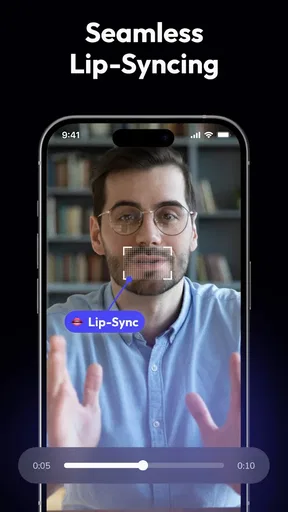
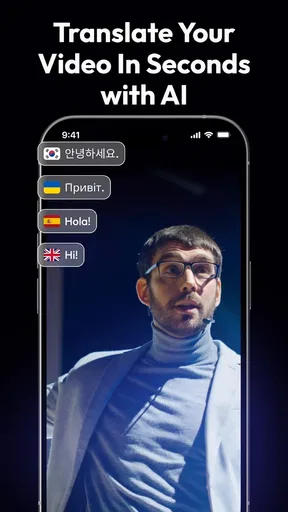
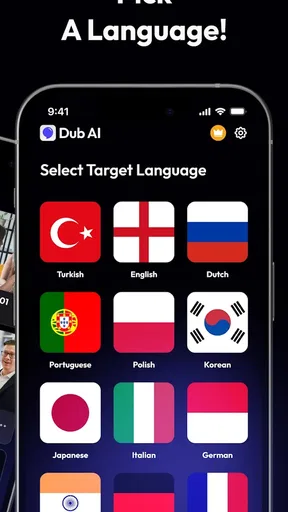
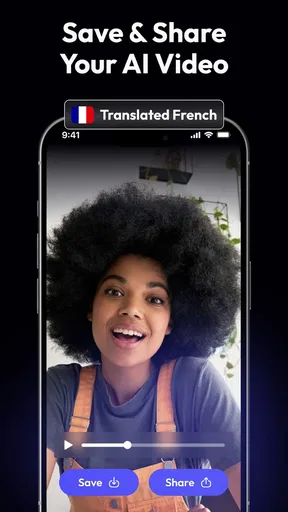
 Analysis by AppCompare
I approach Dub AI as a voice-focused tool rather than a full video editor: its purpose is to help turn spoken content into another language, and that narrow focus is the main reason to consider it. If you make short clips, want to experiment with multilingual versions, or need a quick way to explore voice options, it may fit into your routine. I would not treat it as a guaranteed replacement for a human translator, narrator, or a complete editing workflow.
What the free access and paid options mean
The app is free to download, while optional in-app purchases range from $2.99 to $39.99 per item. That gives you a way to try the app before deciding whether to spend anything, but the range alone does not tell me which tools or limits are tied to each purchase. I’d start with a specific small task and check the purchase screen carefully before paying, rather than assuming a paid option is necessary for basic use.
That distinction matters if you only need an occasional voice transformation. For a one-off experiment, free access may be enough to decide whether the result suits your needs. If you expect to use the app regularly, consider the cost against the time it saves and the quality you get in your own clips. I would not buy an item just because a project feels urgent; first make sure the app can handle the language, voice, and workflow you actually need.
Where the value is—and where it is not
The strongest potential value is convenience. A phone-based tool can make it easier to test a translated voice treatment without organizing a recording session or opening a desktop editing setup. That can be useful for drafts, informal social posts, or deciding whether a piece of content is worth localizing more carefully.
There is a trade-off: a generated voice can help with speed, but language conversion is not just a voice choice. Names, jokes, technical terms, and culturally specific references may need human attention before you publish. I’d listen through the whole result, compare it with the intended meaning, and revise the script where needed. For client work, educational material, or anything where precise wording matters, a fluent speaker’s review is a sensible final check.
A practical way to test it
For a low-risk first try, use a short clip or a few lines of original text rather than sending a long project through immediately. Choose something with clear pronunciation and a simple message, then judge whether the output sounds understandable and appropriate for the audience. This quick test can reveal whether the app’s approach fits your voice and language needs before you invest more time—or money.
A useful workflow is to keep the original script beside the generated result. Mark any changed meaning, awkward phrasing, or names that need special handling, then fix those points before sharing. If the app’s output is mainly for a rough preview, you may accept a little imperfection. If viewers rely on the content, clarity should come before speed.
Worth Reading Before You Choose

EA SPORTS FC Mobile 26 Is a Bigger Football Game, but It Takes Time

Flipboard Shows What News Apps Must Do Beyond the Feed

Switching to Android Auto Means Rethinking Your Driving Routine

Google Calendar Makes a Crowded Week Easier to Manage

Ludo King Makes the Most of the Minutes Between Plans

Baby Panda World Brings Quick Play to Modern Phones, but Its Game Library Feels Busy
Getting Started with Dub AI
Hey there! So, I recently stumbled upon this nifty app called Dub AI - Voice Generator, and let me tell you, it’s a game-changer for anyone who loves creating content. Picture this: you can generate realistic voiceovers with just a few taps on your phone. Intrigued? Let’s dive into the details.
First things first, downloading and setting up Dub AI - Voice Generator is a breeze. Available for both Android and iOS, you can easily find it on your respective app store. Once installed, the app welcomes you with a clean and intuitive interface that even a novice can navigate without a hitch.
As soon as you open the app, you’re greeted with a straightforward menu. No need to wade through endless tutorials or settings. Just tap on “Create New Project,” and you’re off to the races. The simplicity is refreshing and makes the app accessible to everyone, from beginners to seasoned pros.
Features That Stand Out
What sets Dub AI apart is its impressive range of voice customization options. You can choose from a plethora of voices, accents, and languages, making it perfect for any project you have in mind. Whether you need a British narrator for your podcast or an upbeat American voice for an advertisement, Dub AI has got you covered.
One of the coolest features is the emotion editor. You can tweak the voice to sound happy, sad, excited, or even monotone, adding that extra layer of authenticity to your content. Plus, the app offers a text-to-speech function that’s incredibly accurate, ensuring your script sounds natural and engaging.
Creating Content Made Easy
Let’s talk about the actual process of creating a voiceover. It’s as simple as typing out your script and selecting the voice parameters. The app renders the voiceover in seconds, and you can preview it right away. If it’s not quite right, tweaking settings is a breeze. The app’s responsiveness is top-notch, ensuring you don’t waste any time.
For those who love to experiment, Dub AI offers a sandbox mode where you can play around with different voices and effects. This feature is perfect for content creators who want to add a personal touch or experiment with different styles before settling on the final version.
Integration and Export Options
Once your masterpiece is ready, exporting it is seamless. Dub AI allows you to save your work in various formats, including MP3 and WAV, which is great for compatibility with different platforms. You can also directly share your creations on social media or import them into other apps for further editing.
The app doesn’t stop there; it also integrates smoothly with popular editing software, allowing you to streamline your workflow. This is a major plus for professionals who require efficient and reliable tools for their projects.
Final Thoughts
In a nutshell, Dub AI - Voice Generator is an exceptional tool for anyone involved in content creation. Its combination of ease of use, variety of options, and seamless integration makes it a must-have app in your digital toolkit. Whether you’re a podcaster, video creator, or just someone who loves dabbling in creative projects, this app is definitely worth checking out.
So, next time you need a voiceover, skip the expensive recording studios and give Dub AI a try. You might just find it’s exactly what you’ve been looking for to elevate your content. Happy creating!
How it fits alongside other audio and video tools
In the broader video players and editors category, many familiar apps focus on cutting footage, adding captions, balancing sound, or assembling a finished timeline. Dub AI is better considered as a possible voice step in that process, not a substitute for those editing tasks. A typical editor gives you more control over timing and the visual sequence; a voice-oriented app is useful when the spoken track itself is the part you want to explore.
For a polished video, I would keep the jobs separate: prepare and check the translated wording, create or test the voice, then bring the audio into the editor you already use and align it with the picture. That avoids expecting one mobile app to solve translation, voice direction, sound mixing, and visual editing all at once. If your main need is trimming clips or adding subtitles, a conventional editor is likely the more direct choice.
A realistic everyday workflow
Imagine you have filmed a short how-to clip during a lunch break and want to see whether it could work for viewers who speak another language. I’d begin with the key instructions in a short script, rather than trying to convert every hesitation and aside from the original recording. Then I’d listen for whether the important steps remain clear, especially product names or phrases that could be misunderstood, before deciding whether the voice is suitable for a public post.
If it sounds convincing enough for a draft but not for publication, that is still useful: you have learned where the language version needs editing and whether the idea is worth developing. If it is going to customers or students, I’d have a fluent speaker review the wording and make sure the voice does not make the instructions harder to follow. The practical benefit is a quicker first pass, not a reason to skip quality control.
Who is likely to get the most from it?
I can see the appeal for social creators testing a second-language version of a clip, hobbyists experimenting with narration, or someone who wants to hear how a written line might sound in a different voice. It can also be handy when you are preparing a rough concept and want to compare a few directions before recording anything more carefully. In those situations, ease of trying an idea may matter more than studio-level control.
It is less suitable if your work depends on exact translation, consistent character performance, precise timing against video, or a highly personal delivery. A human voice artist or translator is a better fit when nuance and accountability are central. Likewise, if you need detailed multitrack mixing or a complete post-production suite, use an editor built around those jobs and treat voice generation as a separate step if needed.
What to check before relying on a result
One helpful habit is to test tricky words early. Put a person’s name, an acronym, or a specialized term into a short sample and listen before building a whole narration around it. If pronunciation is off, you can decide whether to rewrite the line or use another workflow. This small check is more informative than judging a voice only from a simple greeting or sentence.
Also listen with the intended setting in mind. A voice that sounds fine through phone speakers may be less clear over background music, while a dramatic tone can feel out of place in a practical tutorial. I would audition the result in the same context where people will hear it, and keep the original audio available so the generated version can be compared rather than accepted on impression alone.
Developer, availability, and audience
FERASET is the developer behind the app. Dub AI is free to install, is rated for Everyone, and is listed for devices running Android 7.0 or later. Its current version is 2.1.8, and it has more than 100,000 installs. Those details make it approachable to try, though they do not by themselves tell you whether its voice output matches your particular language or project.
Its average rating is 3.6 from around 19,000 ratings, alongside roughly 404 written reviews. I take that as a reason to form my own view with a short test instead of assuming every creator will have the same experience. Voice tools are especially dependent on what you ask them to say and how carefully you review the result.
My buy-or-skip verdict
I would try Dub AI if I wanted a quick way to experiment with voice and language for casual content, especially when a rough preview would help me decide what to make next. The free download keeps the first step straightforward, while the optional purchases mean I’d confirm what a paid item actually unlocks before spending. A short, representative sample is the best test of value.
I would skip it as my only tool for professional localization, detailed audio production, or any project where a generated voice must be flawless without human review. Used with realistic expectations, it may be a convenient part of a creator’s toolkit; used as a substitute for translation judgement or a full editor, it is the wrong tool for the job. My recommendation is simple: test it on a small, low-stakes script, listen critically, and pay only if the result solves a recurring need for you.
Pros
- Realistic voice synthesis enhances user experience.
- Wide range of voice options available.
- User-friendly interface simplifies navigation.
- Fast processing time for quick results.
- Supports multiple languages for versatility.
Cons
- Occasional inaccuracies in voice tone.
- Limited free features in basic version.
- Requires stable internet for best performance.
- High battery usage during extended sessions.
- Some voices sound slightly robotic.
FAQs for Dub AI - Voice Generator
What is Dub AI - Voice Generator and how does it work?
Dub AI - Voice Generator is an advanced application that allows users to create realistic voiceovers using AI technology. By inputting text, the app generates high-quality audio in various accents and languages. It’s perfect for content creators looking to add professional voiceovers to videos, podcasts, or other media projects.
Can I customize the voice and accent in Dub AI?
Yes, Dub AI offers extensive customization options. Users can choose from a wide range of voices, accents, and languages. The app also allows for adjustments in speed, tone, and pitch, ensuring that the generated audio meets the specific needs of your project. This flexibility makes it a versatile tool for diverse applications.
Is Dub AI - Voice Generator free to use?
Dub AI offers both a free version and a premium subscription. The free version provides access to basic features, while the premium subscription unlocks additional voices, languages, and customization options. Pricing details and subscription plans can be found on the app’s download page, allowing users to choose the best fit for their needs.
What platforms is Dub AI available on?
Dub AI - Voice Generator is available for both Android and iOS devices. Users can download the app from the Google Play Store or the Apple App Store. This cross-platform availability ensures that users can access their projects and features seamlessly on multiple devices.
Does Dub AI require an internet connection to function?
Yes, Dub AI requires an internet connection to function optimally. The app leverages cloud-based AI technology to generate high-quality voiceovers. An active internet connection ensures that you can access the latest voice models and updates, maintaining the quality and variety of the audio outputs.


